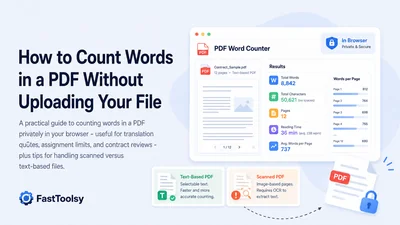
Whether you are pricing a translation job, checking an assignment against a strict word limit, or reviewing the length of a contract, a quick and reliable PDF word count saves real time. The challenge is that PDFs are designed for display, not for editing, so you cannot simply select all and read a counter the way you would in a text editor. The free PDF Word Counter solves this by reading the document directly in your browser and reporting the word count, character count, per-page breakdown, and an estimated reading time - all without sending your file anywhere.
Why an accurate PDF word count matters
Different jobs depend on the number being right, not just close. Here are the most common reasons people need to count words in a PDF:
- Translation quotes. Most translators and agencies price per word or per 1,000 words. A reliable count turns a vague file into a defensible quote, and it lets you compare bids fairly.
- Assignments and essays. Many submissions have a hard minimum or maximum. Counting the final PDF - the exact file you will hand in - avoids surprises that a draft in another format might hide.
- Contracts and reports. Length affects review time, billing, and readability. Knowing the word count up front helps you plan how long a document will take to read or edit.
- Content planning. If you repurpose a PDF into a blog post or a script, the word count and reading time give you a head start on pacing.
Count words in a PDF without uploading it
Browser-based counting keeps the document on your own machine, which matters when the file is a private contract or unpublished coursework. The PDF Word Counter reads your file directly in your browser using PDF.js, so the document is processed on your device and is not uploaded to a server.
Step by step
- Open the PDF Word Counter in any modern browser.
- Choose your PDF or drag it onto the page.
- Wait a moment while the tool reads each page and extracts the text layer.
- Read the results: total words, characters (with and without spaces), an average words-per-page figure, and an estimated reading time based on a common reading speed of about 200 words per minute.
- Scan the per-page breakdown to spot unusually short or long pages, such as a cover page or an appendix.
If you also need the page total on its own - for printing, page-limit rules, or invoicing - the PDF Page Counter gives you that quickly.
Text-based vs scanned PDFs
The single biggest factor in getting an accurate count is whether your PDF contains real, selectable text or is just images of pages.
Text-based PDFs
PDFs exported from Word, Google Docs, a layout program, or "Print to PDF" usually keep a text layer. You can confirm this by opening the file in a viewer and trying to select a sentence with your cursor. If the text highlights, the word counter can read it directly and the count will be dependable.
Scanned or image-based PDFs
A document that was photographed or run through a scanner is often just a picture of each page with no underlying text. In that case there is nothing to count, and a browser counter will report few or no words. The PDF Word Counter flags this situation, letting you know the file appears to be scanned or image-based so you do not mistake an empty result for a real total. To turn such a file into countable words, you first need optical character recognition (OCR) in dedicated software; once you have machine-readable text, you can paste it into the Word Counter for an instant tally.
What to do when the count looks wrong
If the number seems off, work through this short checklist before assuming the tool is mistaken:
- Check for a text layer. Try selecting text in a viewer. No selection usually means a scanned file.
- Watch for password protection. Encrypted PDFs hide their text from any reader until they are unlocked, so the counter cannot reach the words.
- Account for headers, footers, and footnotes. These are real text and will be included; if you want only the body, that explains a higher-than-expected count.
- Mind tables, captions, and figure labels. Short fragments add up and can shift a total noticeably in data-heavy documents.
- Re-export if possible. Generating a fresh PDF from the source document often produces a cleaner text layer than an old or heavily edited file.
Getting more than just a number
Sometimes you need the words themselves, not only the count - for example to quote an excerpt, reuse a paragraph, or run a closer analysis. The PDF Text Extractor pulls the readable text out so you can copy or save it. Once you have plain text, two follow-up steps are common:
- Drop the text into the Word Counter to verify totals and check character limits.
- Use the Reading Time Calculator to estimate how long the content will take to read aloud or review - handy for presentations and study planning.
This pairing - count, then extract, then refine - covers most real document tasks without any installation.
Quick tips for accurate, repeatable counts
- Always count the final exported PDF, since formatting changes between drafts can shift the total.
- For translation quotes, agree in advance on whether numbers, headers, and footnotes are included.
- Keep a copy of the per-page breakdown when a job is billed in stages.
- If a file is scanned, OCR it first, then count the cleaned-up text rather than guessing.
Related tools & toolkits
Pair the word counter with the PDF Page Counter for page totals and the PDF Text Extractor when you need the actual words. For plain-text work, the Word Counter and the Reading Time Calculator are quick companions. Browse the full PDF Toolkit, see every collection in All Toolkits, or start from the FastToolsy homepage. To go from raw text to a polished document, follow the Count, Clean, and Export Text to PDF workflow.
Frequently Asked Questions
How do I count words in a PDF for free?
Open the PDF Word Counter, select your file, and let it read the text layer in your browser. It reports total words, character counts, a per-page breakdown, and an estimated reading time at no cost.
Why does my scanned PDF show zero or very few words?
A scanned PDF is usually a set of page images with no selectable text, so there is nothing to count. Run the file through optical character recognition (OCR) first to create machine-readable text, then count that text.
Is counting words in a PDF accurate?
For text-based PDFs the count is reliable because the tool reads the real text layer. Accuracy depends on whether you want to include extras such as headers, footers, footnotes, and figure captions, which are all counted as words.
Can I count words in a password-protected PDF?
No. An encrypted or password-protected PDF hides its text from any reader until it is unlocked, so the counter cannot reach the words. Remove the protection in software that supports it, then count the open file.
What is the difference between a word count and a page count?
A word count measures the number of words in the text, which is what translators and assignment limits usually care about. A page count measures how many physical pages the file has, which matters for printing, page limits, and some invoicing. The PDF Page Counter handles the latter.
كيف تحسب عدد الكلمات في ملف PDF دون رفعه
سواء كنت تُسعّر مشروع ترجمة، أو تتأكد من التزام واجب دراسي بحد أقصى صارم، أو تراجع طول عقد قانوني، فإن الحصول على عدد كلمات PDF بسرعة ودقة يوفّر وقتاً حقيقياً. المشكلة أن ملفات PDF مصممة للعرض لا للتحرير، لذلك لا يمكنك ببساطة تحديد النص بالكامل وقراءة عدّاد كما تفعل في محرّر نصوص. أداة PDF Word Counter المجانية تحل ذلك بقراءة المستند مباشرة داخل متصفحك وعرض عدد الكلمات والحروف وتوزيع الكلمات على كل صفحة مع زمن قراءة تقديري.
لماذا يهم عدد الكلمات الدقيق
تختلف الأسباب التي تدفع الناس إلى حساب الكلمات في PDF، ومن أكثرها شيوعاً:
- عروض أسعار الترجمة: يُسعّر معظم المترجمين بحسب الكلمة أو لكل ألف كلمة، فالعدد الدقيق يحوّل الملف الغامض إلى عرض سعر واضح.
- الواجبات والمقالات: كثير من المهام لها حد أدنى أو أقصى صارم، وحساب الملف النهائي يجنّبك المفاجآت.
- العقود والتقارير: يؤثر الطول على وقت المراجعة والقراءة، ومعرفة العدد مسبقاً تساعدك على التخطيط.
احسب الكلمات دون رفع الملف
الحساب داخل المتصفح يُبقي المستند على جهازك، وهو أمر مهم حين يكون الملف عقداً خاصاً أو عملاً دراسياً غير منشور. تقرأ أداة PDF Word Counter ملفك مباشرة في متصفحك باستخدام مكتبة PDF.js، لذا تتم معالجة المستند على جهازك ولا يُرفع إلى أي خادم. لاستخدامها افتح الأداة، ثم اختر ملف PDF، وانتظر لحظة ريثما تقرأ الأداة كل صفحة وتستخرج طبقة النص، ثم اقرأ النتائج: إجمالي الكلمات والحروف، ومتوسط الكلمات لكل صفحة، وزمن قراءة تقديري. وإذا أردت عدد الصفحات وحده فإن PDF Page Counter يوفّره بسرعة.
الملفات النصية مقابل الممسوحة ضوئياً
أهم عامل في دقة العدّ هو ما إذا كان ملف PDF يحتوي نصاً حقيقياً قابلاً للتحديد أم مجرد صور للصفحات. الملفات المصدّرة من برامج الكتابة تحتفظ عادةً بطبقة نص يمكن قراءتها بدقة، ويمكنك التأكد بمحاولة تحديد جملة بالمؤشر. أما المستند الممسوح ضوئياً فهو غالباً صورة لكل صفحة دون نص أساسي، فلا يجد العدّاد ما يحسبه ويبلّغ بعدد قليل أو معدوم. تنبّهك الأداة عندما يبدو الملف ممسوحاً ضوئياً حتى لا تظن أن النتيجة الفارغة عدد حقيقي. لتحويل مثل هذا الملف إلى كلمات قابلة للعد تحتاج أولاً إلى التعرّف الضوئي على الحروف (OCR)، ثم يمكنك لصق النص الناتج في Word Counter للحصول على عدّ فوري.
عندما يبدو العدد غير صحيح
قبل أن تفترض خطأ الأداة، تحقق من النقاط التالية: هل يوجد نص قابل للتحديد، أم أن الملف ممسوح ضوئياً؟ وهل الملف محمي بكلمة مرور بحيث يُخفي نصه عن أي قارئ حتى يُفتح؟ وتذكّر أن الترويسات والتذييلات والحواشي تُحسب جميعاً كلمات، ما قد يفسّر عدداً أعلى من المتوقع. وإن أمكن، أعِد تصدير ملف PDF من المستند الأصلي للحصول على طبقة نص أنظف.
الأسئلة الشائعة
كيف أحسب كلمات PDF مجاناً؟
افتح أداة PDF Word Counter، واختر ملفك، ودع الأداة تقرأ طبقة النص داخل متصفحك. ستعرض إجمالي الكلمات والحروف وتوزيع الصفحات وزمن قراءة تقديري دون أي تكلفة.
لماذا يظهر ملفي الممسوح ضوئياً بصفر كلمة؟
الملف الممسوح ضوئياً مجموعة صور للصفحات دون نص قابل للتحديد، فلا يوجد ما يُحسب. مرّره عبر برنامج OCR أولاً لإنشاء نص قابل للقراءة آلياً، ثم احسب ذلك النص.
هل عدّ الكلمات في PDF دقيق؟
بالنسبة للملفات النصية يكون العدّ موثوقاً لأن الأداة تقرأ طبقة النص الحقيقية. تعتمد الدقة على رغبتك في تضمين الترويسات والتذييلات والحواشي والتعليقات، فجميعها تُحسب كلمات.
ما الفرق بين عدد الكلمات وعدد الصفحات؟
عدد الكلمات يقيس كمية النص، وهو ما يهم المترجمين وحدود الواجبات، بينما يقيس عدد الصفحات عدد صفحات الملف، وهو ما يهم الطباعة وحدود الصفحات. يتولّى PDF Page Counter حساب الصفحات.